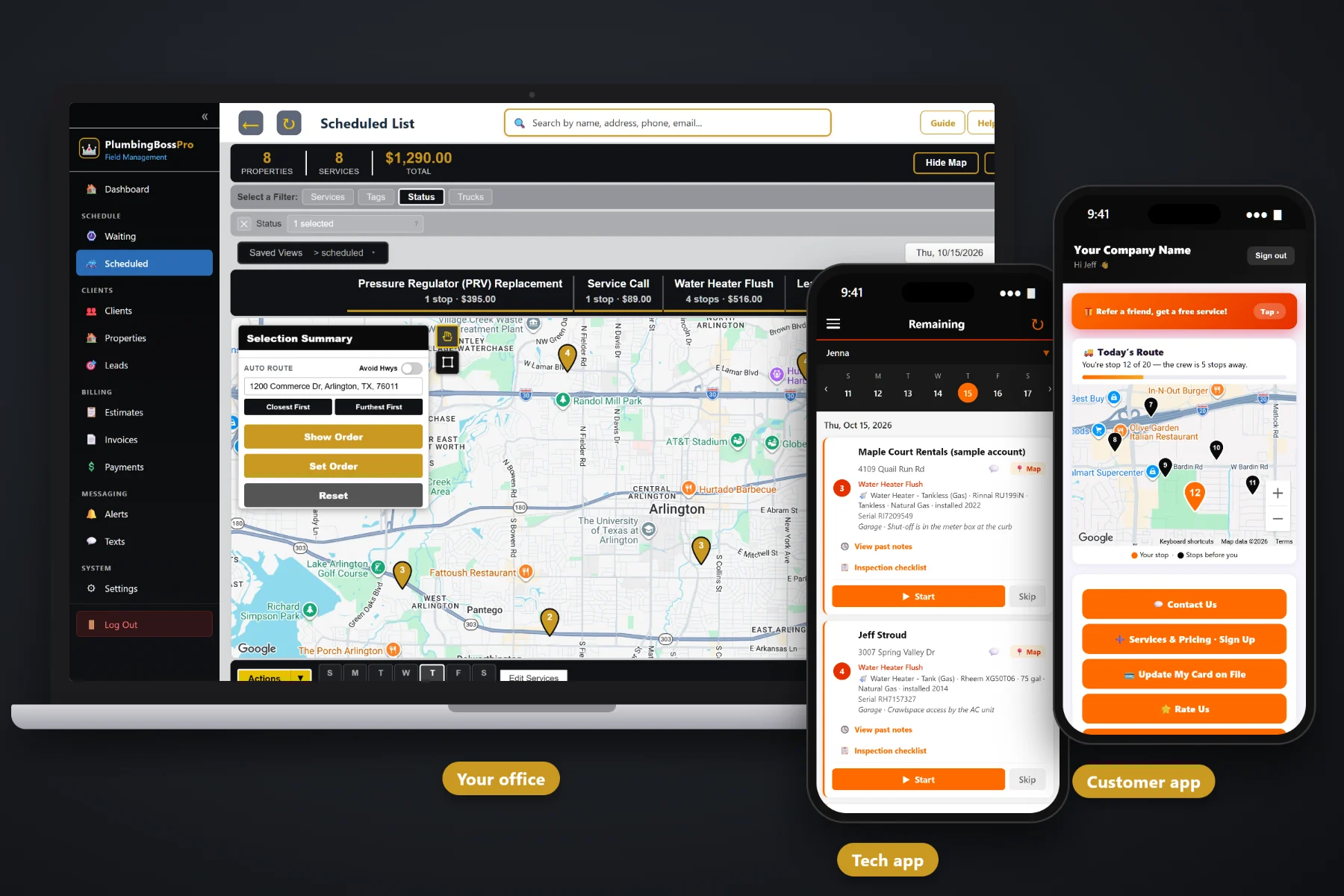
A property manager is one phone number and forty addresses. A restaurant owner wants the grease line jetted before it backs up, not after. A landlord wants to know what was done in the rental without driving over. PlumbingBossPro keeps every address under one account, saves the equipment at each building, brings jetting and backflow visits due on their own, sends photo proof with the job, and bills the whole account on one monthly statement.
Plans start at $59/month, and multi-address accounts, monthly statements and recurring visits come with every plan. To see how commercial accounts fit with residential service calls, drain cleaning, water heaters, dispatch and the tech app, start at PlumbingBossPro and then come back here for the account side.
A property manager, a landlord or a restaurant group is one client with every address listed under it. No duplicate customers to merge later.
Water heaters, backflow preventers, sump pumps and shut-offs saved with brand, model, serial, size and location at each address.
Grease-line jetting every 14 or 30 days, yearly backflow tests and water heater flushes land on the Waiting List on their own.
Before-and-after photos taken on the tech's phone stay with the job, so the manager sees the work without a site visit.
Two-way texting from the office with property managers and kitchen managers, kept with the client record.
Set the account to Monthly and every address lands on one statement, each line labeled with the address it belongs to.
Commercial work falls apart in the details: which unit, which closet, which lockbox, which manager signs off. PlumbingBossPro keeps the account at the top and the addresses under it, and each address carries its own equipment list and access notes. The tech sees exactly what is at that building, and the office sees everything the account owns.
Commercial accounts are worth having because they bring steady work. They are only worth keeping if the paperwork does not eat the profit. PlumbingBossPro keeps the setup short and the monthly routine shorter, so a shop with a few vans can carry managers and restaurants next to its homeowners.
Add the property manager, landlord or restaurant as one client, then import or type in every address they own or manage.
Water heaters, backflow preventers, sump pumps and shut-offs, plus lockbox codes, key notes and business hours.
Grease-line jetting every 14 or 30 days, yearly backflow tests and flushes. Each visit lands on the Waiting List when it comes due.
Set the account to Monthly and every job across every address rolls into one statement, each line labeled by address.
Most service software was built around one customer at one house. Put a property manager into it and you get forty separate customers, forty separate invoices and no single place to see what the account is worth or what is due next.
Ask any plumber who has taken on a property manager how the first few months went. Invoices sent to the wrong person. A lockbox code living in one tech's phone. A restaurant that called on a Friday night because the grease line was not jetted when it was supposed to be. And a manager asking for one bill a month instead of thirty emails.
That information belongs on the account and the address, not on a whiteboard. When it lives there, any tech can run any building and the office can answer the manager's question in one look.
PlumbingBossPro keeps the account, its addresses, its equipment and its billing in one place, from the first quote to the monthly statement.
Every tool here exists to carry property managers, landlords, restaurants and light commercial buildings without a second office person to manage them.
One account for the manager or owner, with every rental, building, store or kitchen listed under it.
Water heaters, softeners, backflow preventers, sump pumps, ejectors and shut-offs with model, serial, size and location.
Set by minimum days between visits: grease-line jetting every 14 or 30 days, backflow tests and flushes every 365.
Every visit that came due on a live map, colored not due yet, due now and overdue past the grace period.
Access notes on each address say when the kitchen is quiet, when the office opens and where the key is.
Put jetting and backflow on one van and service calls on another. Auto-route Closest First or Furthest First from the shop.
Before-and-after photos from the tech's phone saved with the job for the manager or owner.
Checklist, readings and a condition on the tech app, printed as a Plumbing Inspection Report for the owner.
Estimates built from your service list. The manager approves online and the approved estimate becomes the job.
Text property managers and kitchen managers from the office. Plans include a monthly text allowance.
One statement per account per month, every line labeled with its address.
Smaller landlords can pay by card on file, charged at completion or on a schedule.
Mark accounts as property manager, restaurant or church, and store PO numbers or unit counts.
See work and billing by client, so you know which accounts carry their weight.
Bring in a manager's address list in one file. Addresses are placed on the map automatically.
Start $59, Pro $89 and Crew $199 per month, with multi-address accounts on every plan.
The restaurant on a 14-day jetting plan, the apartment building with a yearly backflow test and the landlord's twelve water heaters on yearly flushes all come due on the Waiting List from each plan's minimum days between visits. The office assigns them to a van and a day, sets the order, and the tech's phone shows the same order with the equipment and access notes on each card. For the full picture of running commercial accounts, read Commercial Plumbing Software: The Complete Guide to Property Manager, Landlord and Restaurant Accounts.
A property manager does not want to stand in a rental to check a repair. Photos from the tech's phone stay with the job, the inspection report prints for the owner, and two-way texting keeps the manager in the loop from the office. Quotes go out for online approval, and the monthly statement shows every address on one page. Managers can also request service, see invoices and pay from the customer app.
Pick the plan that fits your shop. Every plan starts with a 14-day free trial and no credit card.
Compare plans on the pricing page.
Yes. A property manager, landlord or restaurant group is one client, and every rental, building or location is an address under that client. Each address keeps its own equipment, access notes and job history, and the account can be billed on one monthly statement.
Set the account to Monthly. Instead of an invoice per job, the account gets one statement each month covering every address, and each line is labeled with the address the work was done at, so the manager can split it across owners or buildings.
Yes. Set the jetting plan by minimum days between visits, such as every 14 or 30 days. Each visit comes due on the Waiting List on its own, and access notes can say when the kitchen is quiet enough to work.
Before-and-after photos saved with the job, a printable Plumbing Inspection Report, quotes they can approve online, two-way texts from your office and a monthly statement. In the customer app they can request service, see invoices and pay.
No, and we would rather say so. PlumbingBossPro is built for service, repair and recurring maintenance across many addresses. Large new-construction and high-rise projects with phased bids and long job schedules are outside the typical use.
Start is $59/month, Pro is $89/month, and Crew is $199/month. Multi-address accounts and monthly statements are on every plan, and every plan starts with a 14-day free trial with no credit card.
Commercial accounts are one piece of how PlumbingBossPro runs a plumbing company. For service calls, drain cleaning, water heaters, dispatch, the tech app and billing, see the full PlumbingBossPro platform overview.
Practical reading on winning manager and landlord accounts, rentals, apartments, restaurants, light commercial buildings, equipment records, monthly statements, make-ready calls, keys and access, photos, quotes, texting, backflow tests and keeping accounts renewing.
Multi-address accounts, equipment at every building, recurring jetting and backflow visits, photo proof and one monthly statement per account. Try PlumbingBossPro free for 14 days.