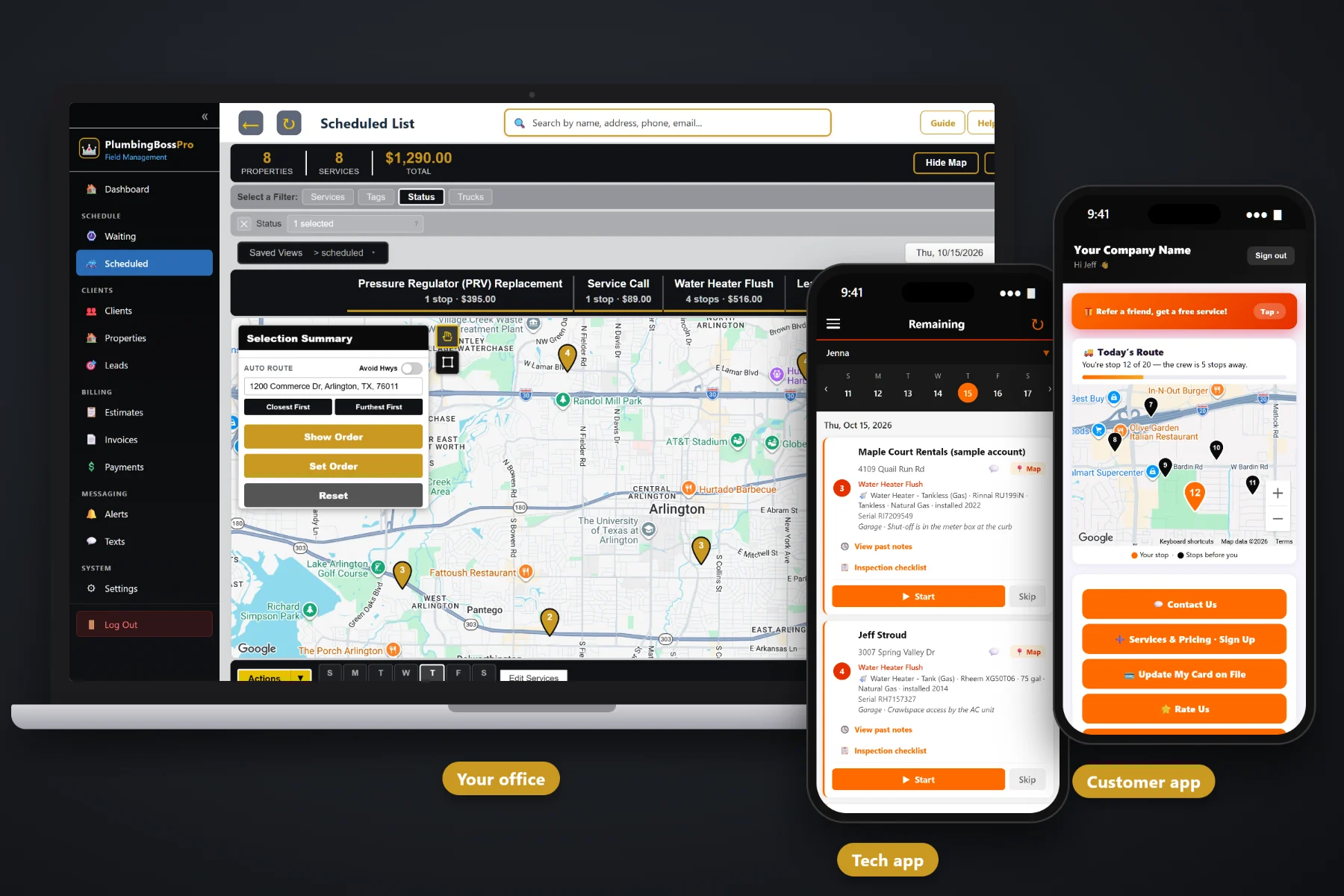
A plumbing day is a string of service calls, drain jobs and water heater visits, each behind a different door with a different tank in a different corner of the house. PlumbingBossPro puts the day's calls in route order on the plumber's phone, with one-tap navigation, the equipment and shut-off notes on every card, past notes, an inspection checklist, Start / Skip / Complete, before-and-after photos, automatic on-the-way and arrived texts, and a card-on-file charge when the job is done.
Plans start at $59/month, and the tech app is part of every plan. The route, navigation, equipment details, inspection checklist, photos, customer texts and payment at completion come with the platform, not as an add-on. To see how the tech app fits with the Waiting List, dispatch, recurring flushes and billing, start at PlumbingBossPro and then dig into the plumber's side here.
Each plumber sees their own calls in the order set on the dispatch board. Finish one, read the next card, close the van and go.
Every job card has a navigation button that opens directions to the address. Nobody types a street name with wet hands.
“Water Heater - Tank (Gas) · Rheem XG50T06 · 50 gal” under the address, with the serial, the location and the shut-off note.
The clog, the leak, the corroded fitting and the old tank, saved with the job for the day someone asks what was wrong.
On-the-way and arrived texts go out on their own. Customers pick their alerts, and replies go to the office.
Complete creates the invoice and can charge the card on file before the van leaves the curb.
Every house keeps a list of its equipment in PlumbingBossPro: the water heater, the softener, the sump pump, the main shut-off, the cleanout. That list shows on the plumber's phone, so the tech knows the tank is a 50-gallon gas unit in the garage and the shut-off is in the meter box at the curb before walking up the driveway.
Plumbers did not get into the trade to fill out forms on a phone. PlumbingBossPro asks for a few taps per call and gives back the address, the equipment, the way in and a quieter office phone. It runs in the browser on the iPhones and Android phones your crew already carries, with no app store download.
Set up employees with a personal PIN, assign them to vans, and add your customers with the equipment at each house.
Yearly water heater flushes, softener service, backflow tests and restaurant grease lines land on the Waiting List map when they come due.
The dispatch board sets each van's order, by hand or by auto-routing from the shop, and the plumber's phone shows the same order.
Log in with company login and PIN, tap navigation, read the card, tap Start, work the checklist, take the photos, tap Complete.
Most field-service apps give a job an address and a notes box. A plumbing call is a water heater with a model and serial number, a shut-off somewhere outside, a cleanout behind a shrub and a story from the last visit. An app that only knows the address leaves half of every call on a clipboard.
Ask any service plumber how the day really runs and you will hear the same story: a dispatch text that changed twice before lunch, a homeowner who could not remember the brand of the water heater, and a house where nobody wrote down where the main shut-off actually was. Whether the tank was gas or electric. Whether it was the same unit the company flushed last year. Whether anybody told the customer the van was coming.
That information belongs on the house, not on a clipboard or in one plumber's memory. When it shows up on the phone, any plumber can run any call and the office stops answering “where's the shut-off?” calls.
PlumbingBossPro keeps the job, the equipment, the address and the customer in one place, from the first estimate to the paid invoice.
Every tool here exists to get plumbers through a full day of service calls, drains and water heaters with fewer phone calls, fewer surprises and fewer trips back.
Plumbers sign in with your company login and a personal PIN, so every job, photo and clock-in belongs to the right person.
Each plumber sees their own calls in the order set on the dispatch board, and the list follows when dispatch moves a job.
One tap from the job card opens directions to the address.
Water heater type, brand, model, serial, size, fuel and year installed, plus softeners, sump pumps and more.
Where the tank sits, where the main shut-off is, and how to reach the cleanout, on every card.
What the last plumber found and recommended, read before knocking on the door.
Shut-off, pressure, water heater temperature, flush, anode, relief valve, leaks, fixtures, drains and more, with readings and a condition.
Three buttons tell the office what is underway, what is done, and what was skipped and why.
Clogs, leaks, corroded fittings and old tanks, saved with the job.
Sent automatically. Customers choose night before, when they are next, and when the tech arrives.
In the customer app: "You're stop 12 of 20 — the crew is 5 stops away."
Complete creates the invoice and can charge the card on file. Property managers can get one monthly statement.
Plumbers clock in and out on the same phone, so hours are recorded as they happen.
Crew locations show on the office map, so the office knows which van is closest to an emergency call.
Runs in the browser and installs to the home screen. No app store, no special devices.
Start $59, Pro $89 and Crew $199 per month, with the tech app on every plan.
The plumber's list starts with service calls booked by the office and recurring work from the Waiting List, a live map of every visit that has come due. Yearly flushes, softener service and backflow tests come due on their own from each plan's minimum days between visits. The office assigns calls to a van and a day, auto-routes Closest First or Furthest First from the shop, and the phone shows the same order. As plumbers tap Complete, the office sees jobs done, checklists filled, photos attached and invoices created. For a full walkthrough of the plumber's day, read Plumber App: The Complete Guide for Plumbing Companies and Their Techs.
Almost every plumbing call needs someone to open the door. Automatic reminders the night before, on-the-way and arrived texts as the plumber works the route, and a live map in the customer app all tell the homeowner when to expect the van. Replies come back to the office through two-way texting, and when the job is complete the invoice, online payment and card on file are all in the customer app.
Pick the plan that fits your operation. Every plan starts with a 14-day free trial and no credit card.
Compare plans on the pricing page.
Their calls for the day in route order. Each card has the address with a navigation button, the equipment at the house (for a water heater: type, brand, model, serial, size, fuel and year installed), the location and shut-off notes, and past notes from earlier visits. They tap Start, Skip or Complete, fill in the inspection checklist when the job calls for it, take before-and-after photos, and the customer gets automatic on-the-way and arrived texts.
No app store download. The app runs in the browser on iPhone and Android and can be installed to the home screen. Plumbers log in with your company login and their own personal PIN.
The office sees the job done with its photos, notes and checklist, the invoice is created, and a card on file can be charged. Recurring work like a yearly flush comes due again on the Waiting List on its own, based on the plan's minimum days between visits.
Yes. When the plumber fills in the inspection checklist and readings, the office sees them on the job and can print a Plumbing Inspection Report with the condition and recommendations for the homeowner.
The app needs a data connection to load calls, save notes and photos and complete jobs. Plumbers with weak signal below grade usually step outside or near a window to finish up, or connect to the customer's Wi-Fi if offered.
Start is $59/month, Pro is $89/month, and Crew is $199/month. The tech app is on every plan, and every plan starts with a 14-day free trial with no credit card.
The tech app is one piece of how PlumbingBossPro runs a plumbing company. For the Waiting List, dispatch, estimates, recurring maintenance, property manager accounts and billing, see the full PlumbingBossPro platform overview.
Practical reading on installing the app, logging in, route order, navigation, equipment cards, past notes, the inspection checklist and report, Start / Skip / Complete, photos, customer texts, payment at completion, the time clock, crew GPS and onboarding new plumbers.
Calls in route order, equipment on every card, an inspection checklist, before-and-after photos, automatic customer texts and payment at completion on every plumber's phone. Try PlumbingBossPro free for 14 days.